
Download NCVT ITI Admit Card 2025 – 1st & 2nd Year Hall Ticket Out.
Are you a student of NCVT and want to download your NCVT ITI Admit Card 2025, but don’t know how to download it or from which website to download the hall ticket? Don’t worry. In this blog, I will explain the full process for downloading the admit card 2025.

As we know, the admit card is usually released one week before any exam. Finally, the NCVT has announced the ITI hall ticket 2025 release date on their official SIDH Portal. All first and second-year students can download their Practical Exam Admit Card from 13th July 2025, while the Theory (CBT ) Exam Admit Card will start getting downloaded from 23rd July 2025, through the official websites of Skill India (SIDH) or NCVT.
| Board Name | National Council of Vocational Training (NCVT) |
| Name of the Exam | ITI (Industrial Training Institute) |
| Practical Exam Admit Card | 15 to 22 July 2025 |
| CBT Exam Admit Card | 23 July to 20 August 2025 |
| Practical Exam Dates | 17 to 22 July 2025 |
| CBT Exam Dates | 28 July to 20 August 2025 |
| Blog Category | Admit Card |
| Exam Type | CBT & Practical Exams 2025 |
| Required Details to Download | Registration no, Father name, Date of Birth |
| Official NCVT Website | ncvtmis.gov.in |
| Official Skill India Portal | skillindiadigital.gov.in |
How to download NCVT ITI Admit Card for 1st and 2nd Year?
The NCVT officially published the ITI Practical Admit Card 2025 on 13th July 2025. All the students of 1st & 2nd year ITI students who have successfully filled out the form can now download their admit card online from the official website SIDH portal, skillindiadigital.gov.in, using their PRN Number or Date of Birth.
Method 1: Download through Skill India Digital Portal (SIDH)
The Government of India has launched a new website, the Skill India Digital Portal (www.skillindiadigital.gov.in). Now, all ITI 1st and 2nd-year students can easily download their admit cards using this new portal.
Step 1: First of all, candidates open the Skill India Portal, skillindiadigital.gov.in.
Step 2: Find the login section on the front page, look for the Login option, and select it.
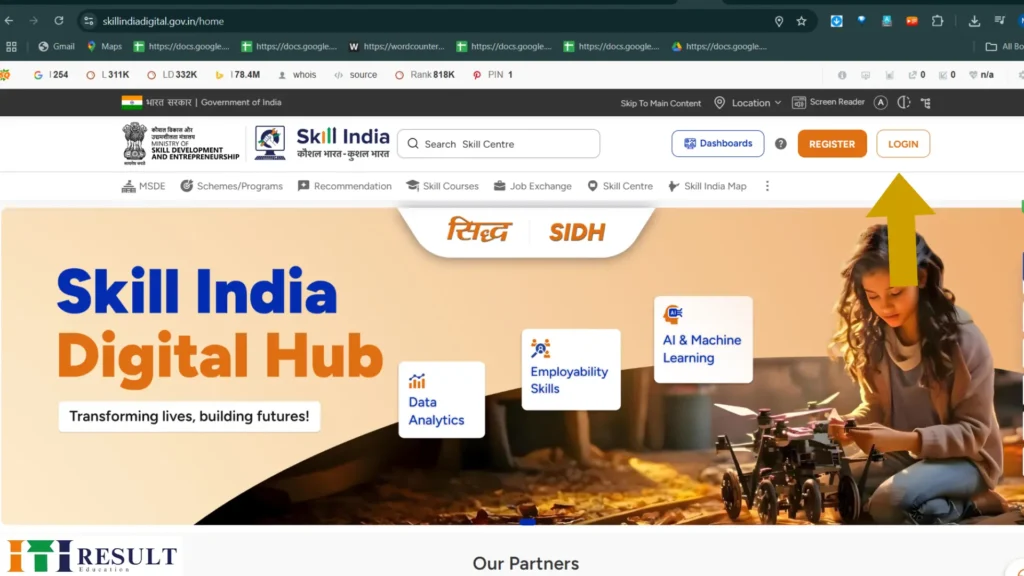
Step 3: Then, you need to enter your PRN number and date of birth, and then press the login button.

Step 4: After logging in, your ITI trainee profile will appear on the screen. Tap on the menu icon 3-line (☰) shown in the top-right corner of this page. After that, from the left side, choose the option related to the Practical Exam or the CBT Exam
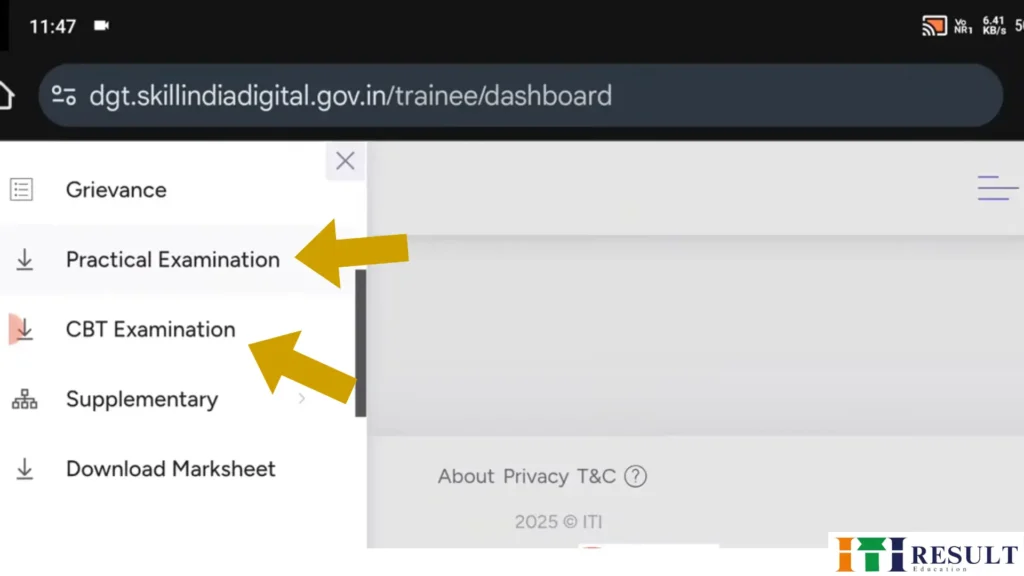
Step 5: Now, your trainee’s information will appear on the screen. Scroll down the page a bit, and you will see the 3 dots below the Action word‘ Click this button, you can see Download Practical Hall Ticket’ and ‘Download CBT Hall Ticket’ options, and the ITI Result download option will also appear.
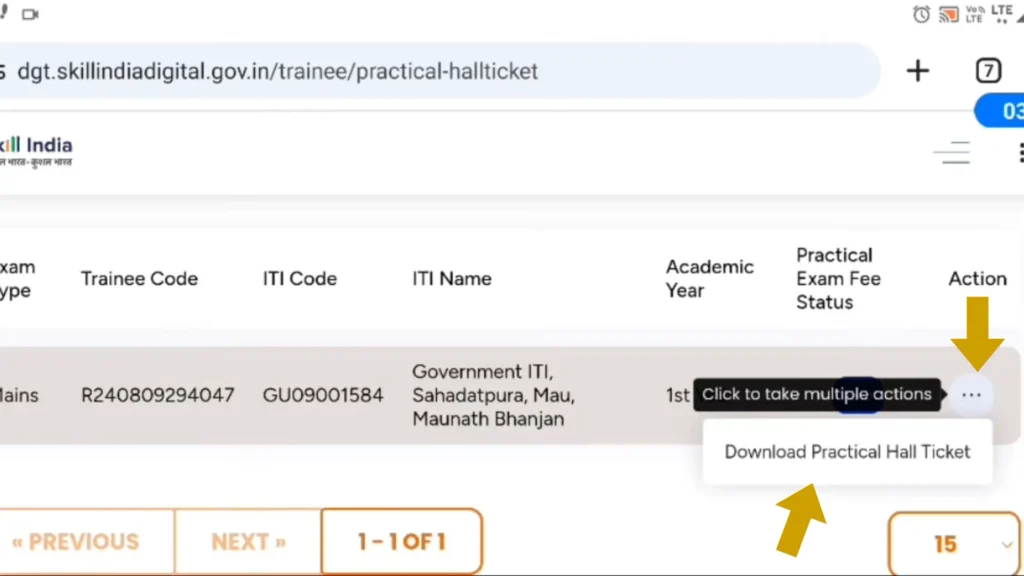
Step 6: Tap on the download button to get your ITI 2025 hall ticket for the practical or CBT exam on your phone or computer.
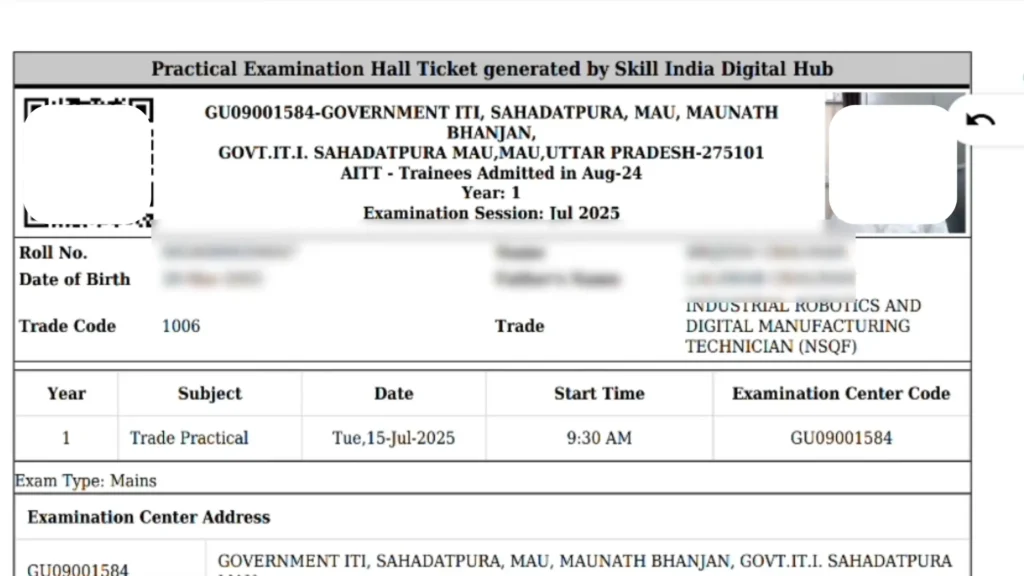
Step. 7: Now, your Practical & CBT ITI Hall Ticket 2025 will display on your mobile screen.
Method 1: Download through the NCVT Website:
Step 1: Open the browser and type the ncvtmis.gov.in in the search bar.
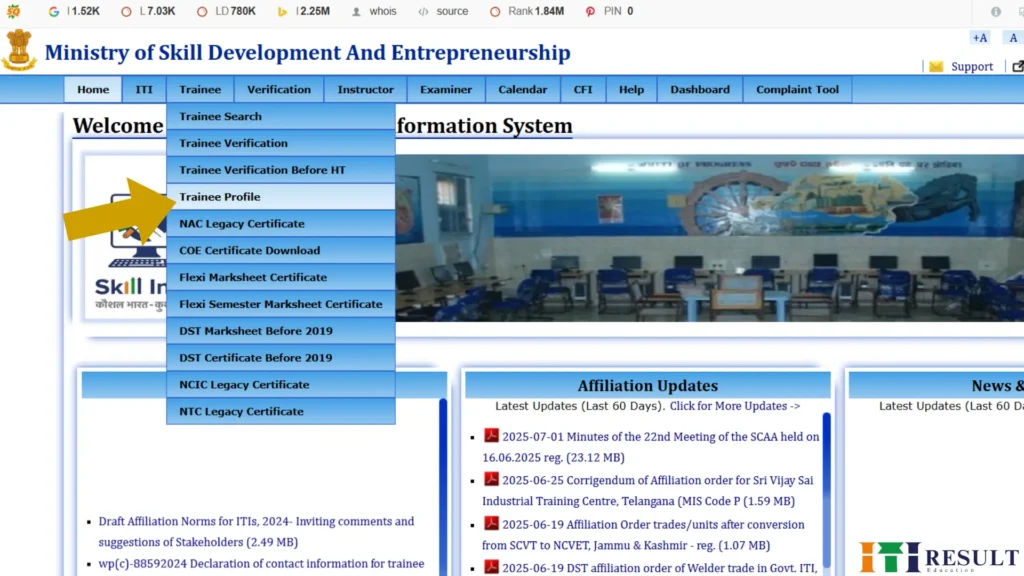
Step 2: You will see the “Trainee” option in the top menu bar on the homepage – click on it.

Step. 3: Next, tap on theTrainee Profile option from the drop-down menu.
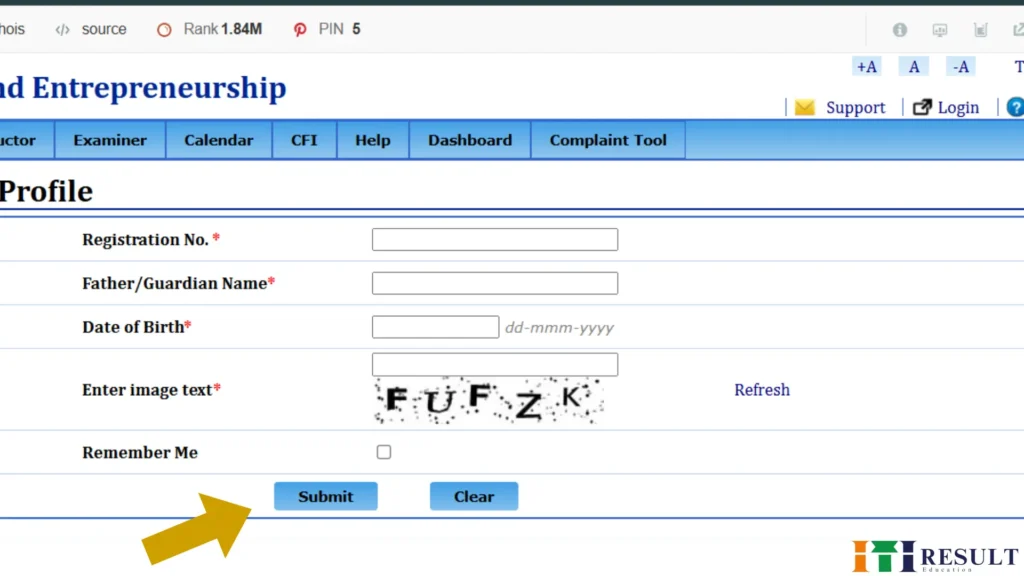
Ste.p 4: Now, a new page will open, where you need to enter details such as your Registration Number, Father’s Name, and Date of Birth, and then click the submit button.
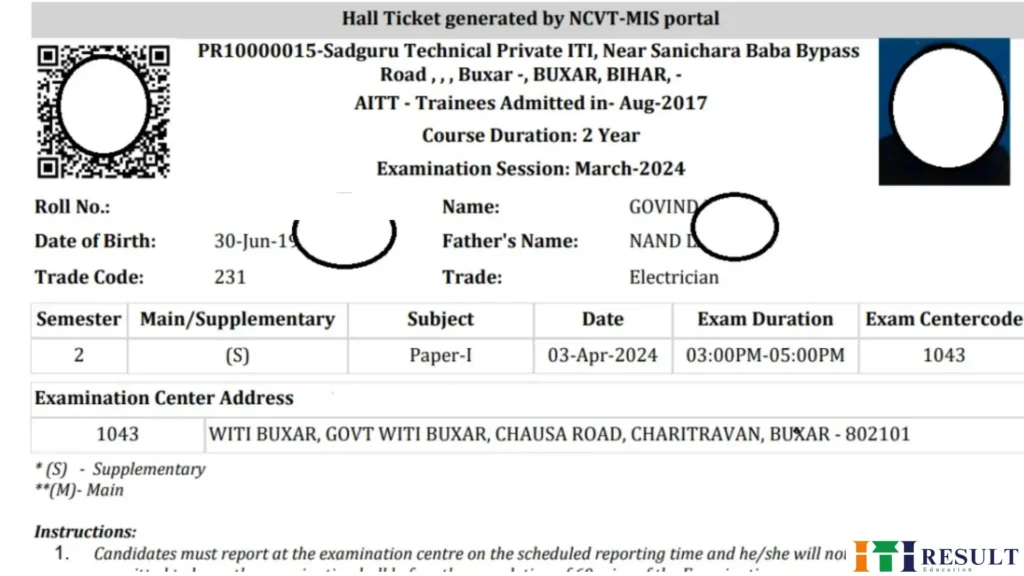
Step. 5: Now, you can see or download their NCVT Admit card 2025.
What to Do If Your Admit Card Is Not Downloading?
Sometimes, while downloading the NCVT ITI Admit Card, the page error or “Record not found” message comes up. Don’t panic, just do these things with a calm mind:
1: Check the Admit card release Date
➡️ Confirm the date of release. If you try before the date, nothing will appear on the portal.
2: Are you entering the correct information?
➡️ If you enter the wrong roll number, registration number, or d, ate of birth, the admit card will not open. Check every digit carefully.
3: If the website server is busy, wait
➡️ As soon as the admit card is launched, thousands of students download it simultaneously, which slows down the site. Wait for 5-10 minutes and try again.
4: Change your browser
➡️ Sometimes the problem is not in the website, but in your browser. Try using Chrome, Firefox, or incognito mode.
5: Visit your ITI centre and seek help
➡️ If you are unable to work online, visit your ITI centre directly. The staff there can download the helpline and give you information immediately.
6: Contact with the official helpline
➡️ Write your problem to the helpline number or email given on the official website of NCVT MIS- 0124-4419167/Noida
💡IMPORTANT: Without an admit card, you will not be allowed to enter the exam hall. Do not take last-minute risks – save and print the admit card as soon as it is released.
Important instructions for the Exam Day
To avoid any kind of issue on the examination day, follow all the points given below.
1: Arrived before the exam starts-
➡️ Arrived the examination center at least 30 minutes before the exam starts.
2: Don’t carry any type of electronic device –
➡️ Do not carry a mobile phone, a smart watch, or any other electronic device in the exam hall.
3: Carry with Admit Card & Aadhaar-
➡️ Carry your admit card and Aadhaar card on exam day.
4: Know the address Advance–
➡️ Know the address of the exam center in advance so that you don’t face any problems in choosing the exam center on the day of the exam.
5: Read all the instructions-
➡️ Read all the instructions written on the Hall Ticket carefully, including what to carry, what not to carry, the exam, and the time sheet.
These details are available on the NCVT Mthe IS Admit Card
These details are given in your Admit Card.
- 1. Candidate’s name
- 2. Registration number
- 3. Date of birth
- 4. Center name and address
- 5. Center code
- 6. Your Roll Number
- 7. Photograph
- 8. Your Father & mother’s name
- 9. Time & date of the examination
- 10. Gender
Important Links
| ITI Hall Ticket 2025 | Download Here |
| NCVT ITI Result 2025 | Check Here |
| NCVT ITI Admission 2025 | Check Details |
Conclusion
In this blog, I have provided you with the complete information about how to download the NCVT ITI Admit Card 2025, including the websites from which you can download the admit card. I have also told you where you can contact me in case your admit card is not downloaded for any reason. I hope this blog will help you download the ITI Hall Ticket.